Speak it — it's already written
Press a hotkey and start talking. VocalFlow turns your speech into clean, fluent text that's ready to send — right at your cursor, in any app.
macOS 14+ · Free quota out of the box · Zero setup
 NotesFileEditView Tue 10:24
 Core experience
Fast, accurate, ready to send
Keeps up with your speech
Real-time recognition with streaming output — text flows at the speed you talk. Done speaking, done typing.
Code editor
Take a look at the Postgres indexes
And update the PRD while you're at it
Knows what you're talking about
It knows which window you're working in — technical terms and mixed-language speech come out right.
Not a transcript — words you can actually send
Fillers, repetition, and slips are cleaned up automatically. What comes out is ready to go — no copy-editing.
Why it's good
Zero setup, works out of the box
No model picking, no API keys, no comparing providers — download and start talking.
Recognition, refinement, and context understanding run as one cloud pipeline. Quality is on us — never degraded because "the model you configured isn't good enough".
We do exactly one thing — turning speech into text — and we do it obsessively well.
VocalFlow
We handle the hard parts
More than an input method
Three surprises on your Mac
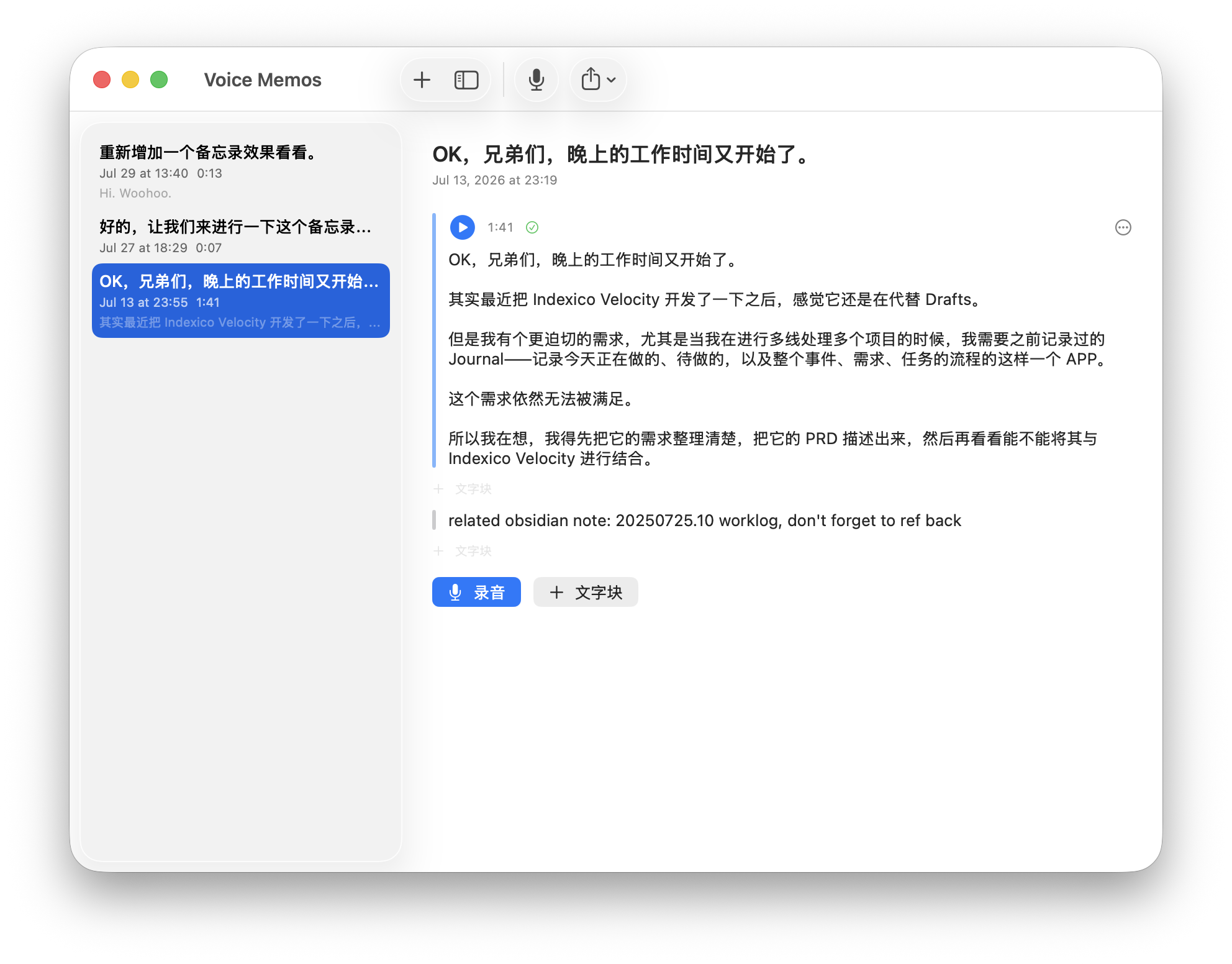
VOICE MEMO
When ideas outrun your hands
In a meeting, on a walk, mid-epiphany — say it first. Audio and text blocks interleave in one note; tidy it up later and export to Obsidian or Apple Notes.
LIVE DICTATION MODE
Like typing, but with your voice
Continuous input for long-form writing and AI chats. Words appear at your cursor as you speak — your train of thought stays intact.
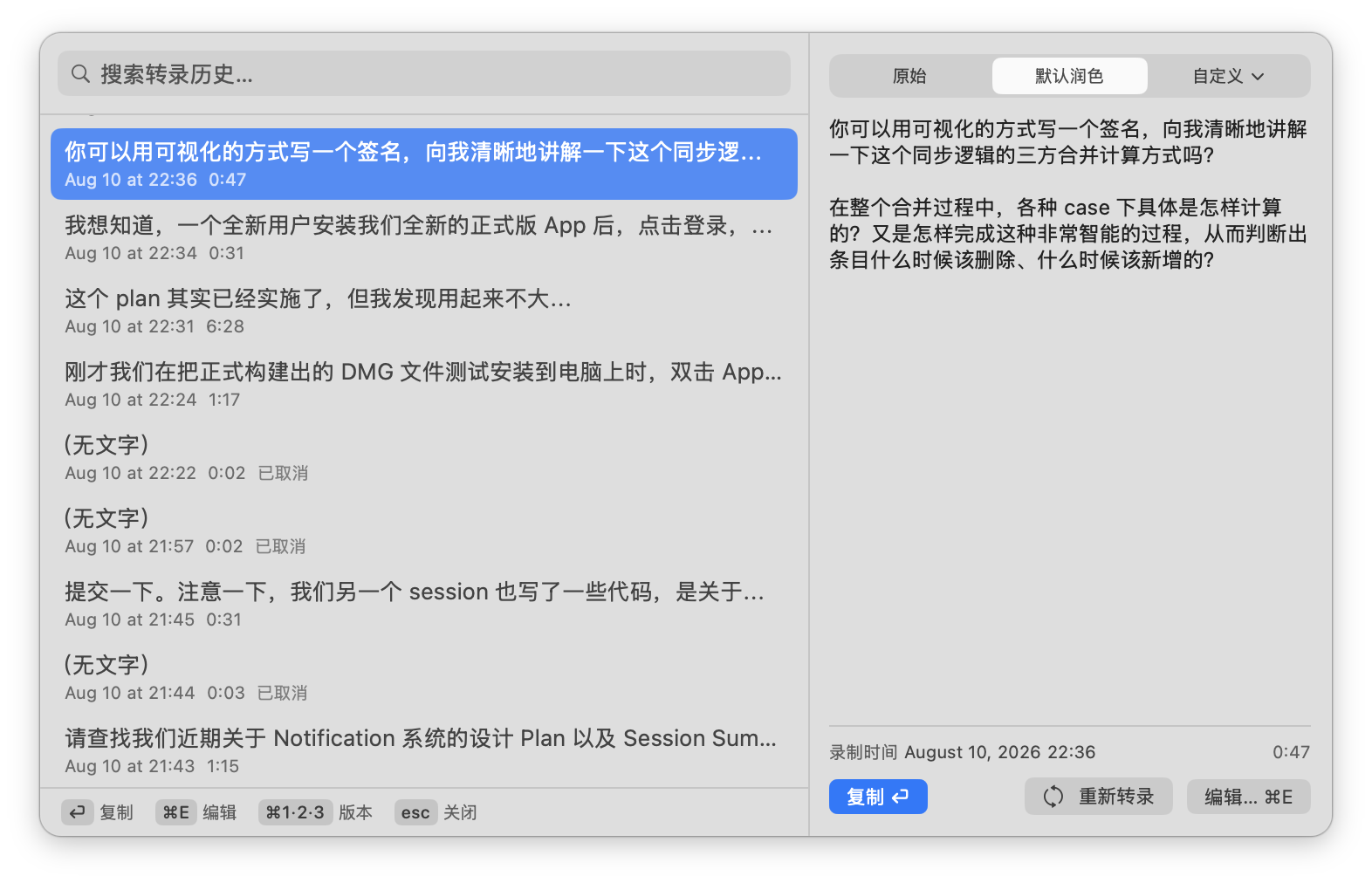
HISTORY SEARCH
Everything you've said, findable
That paragraph you dictated yesterday? Press ⌘⇧C to summon the overlay — find it in one search, edit, and copy it out.
Beyond the Mac
Your voice becomes text, wherever you are
One account, four form factors.
MAC APP
Home base
System-wide dictation, Voice Memo, history search — everything above.
IPHONE SHORTCUT
No app to install
Add the Shortcut and go: one tap from the Lock Screen or widgets to record, results ready to share.
FILE TRANSCRIPTION
Recorders, meetings, voice messages
Upload an audio file, get back a clean transcript.
MOBILE WEB
All your transcripts, anywhere
Open a mobile browser — your complete transcription history is right there.
FAQ
Questions you might have
Are my recordings stored on your servers? + −
Audio is used only to complete the transcription; original recordings are not retained long-term by default. The transcribed text is stored under your account to power history search — you can delete any record, or wipe everything, at any time. See the privacy policy for exact retention terms.
Does it work offline? + −
An internet connection is required. Recognition and refinement run as one cloud pipeline — that is exactly why the quality beats small on-device models. While offline you cannot start new transcriptions, but existing records remain viewable.
Which languages are supported? Can I mix Chinese and English? + −
Both Chinese and English are supported, and mixing them mid-sentence is an everyday scenario. Technical terms and code vocabulary are recognized correctly using the context of the window you are working in. More languages are rolling out.
How is this different from macOS built-in dictation? + −
Built-in dictation gives you a verbatim transcript; VocalFlow gives you refined text you can actually send — fillers and repetition cleaned up automatically. It works at the cursor in any app, and comes with Voice Memo, history search, and the full iPhone / web / file-transcription ecosystem.
How do I use it on iPhone? + −
No app needed. Add the iOS Shortcut, then one tap from the Lock Screen or widgets starts recording — results are ready to share or copy. See the Shortcut install page.
What happens when I use up the free quota? + −
No surprise charges, no silent downgrades. When you hit the limit, transcription pauses with a clear notice. Wait for next month's reset, top up by the minute, or upgrade your plan.